
What is the Documizer?
Documentation, transfer and AI analysis of developments and customizing – in one single local report.
The Documizer reads an SAP system and writes what it finds into a readable HTML document and into a complete XML file. From that same XML it rebuilds the objects in another system.
No repository objects of its own, no text elements, no includes, no classes, no transport, no abapGit. The entire report is one file and creates nothing but itself – which is why it also runs where you are not allowed to install anything: in a customer system, in a sandbox, in a production system with read-only authorisation.
SAP S/4HANA · ABAP
Installed in seconds
Copy the source code, paste it into SE38, activate.
- Open SE38
- Create program
- Paste source code
- Activate
- Done
Five uses, three areas
Document
Documentation of developments
Starting from a package, a report, a table or a class, the Documizer follows the usages and describes every object: fields and keys, source code, function modules, call relationships in both directions. The result is an HTML document with a table of contents – no JavaScript, no external references, still readable in ten years.
Documentation of IMG settings
An IMG structure tree becomes a chapter tree: for each node the IMG activity, the SAP standard documentation, the assigned customizing objects and, on request, their table contents. An implementation project is laid over it as status and note.
Transfer
Developments from system to system
The same XML that carries the documentation also contains the definition data. From it the import rebuilds domains, data elements, tables, structures, views, reports, classes, function groups and message classes – in the right order, with target package and request. For routes on which no transport runs: sandbox, training system, customer installation, systems without a shared landscape.
IMG settings via BC sets
From the customizing of a documented IMG branch the Documizer creates a BC set – dialog-free, de-duplicated and compatible with SCPR20. Customizing then travels to the target system the way SAP intended, instead of through hand-written table entries.
Analyse
XML as input for AI
A package or an IMG branch becomes a single file that an AI such as Claude can read in full – with source code, fields, call relationships and customizing values in context. “Somewhere in this system” turns into an answerable question.
From selection screen to finished document
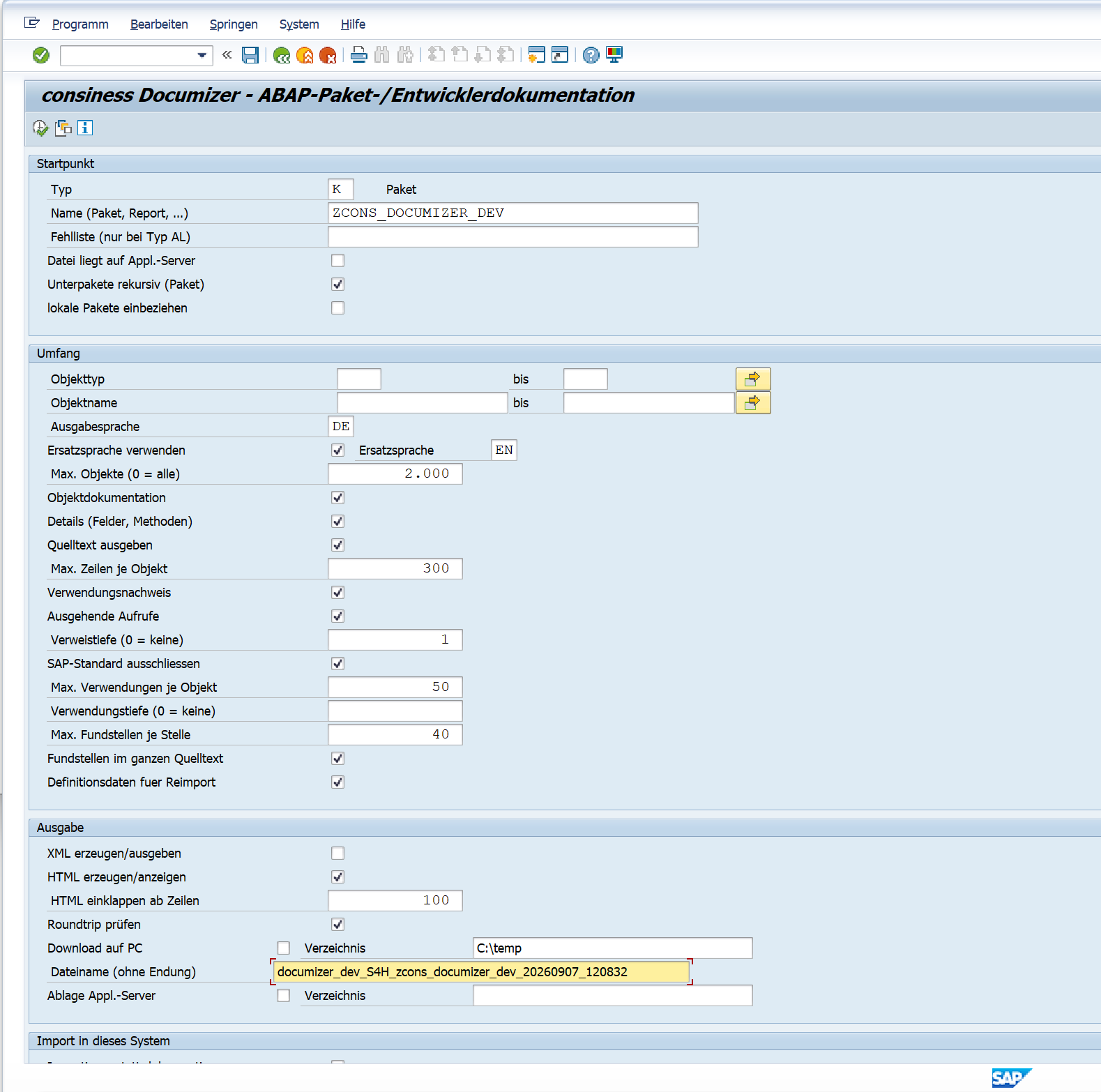
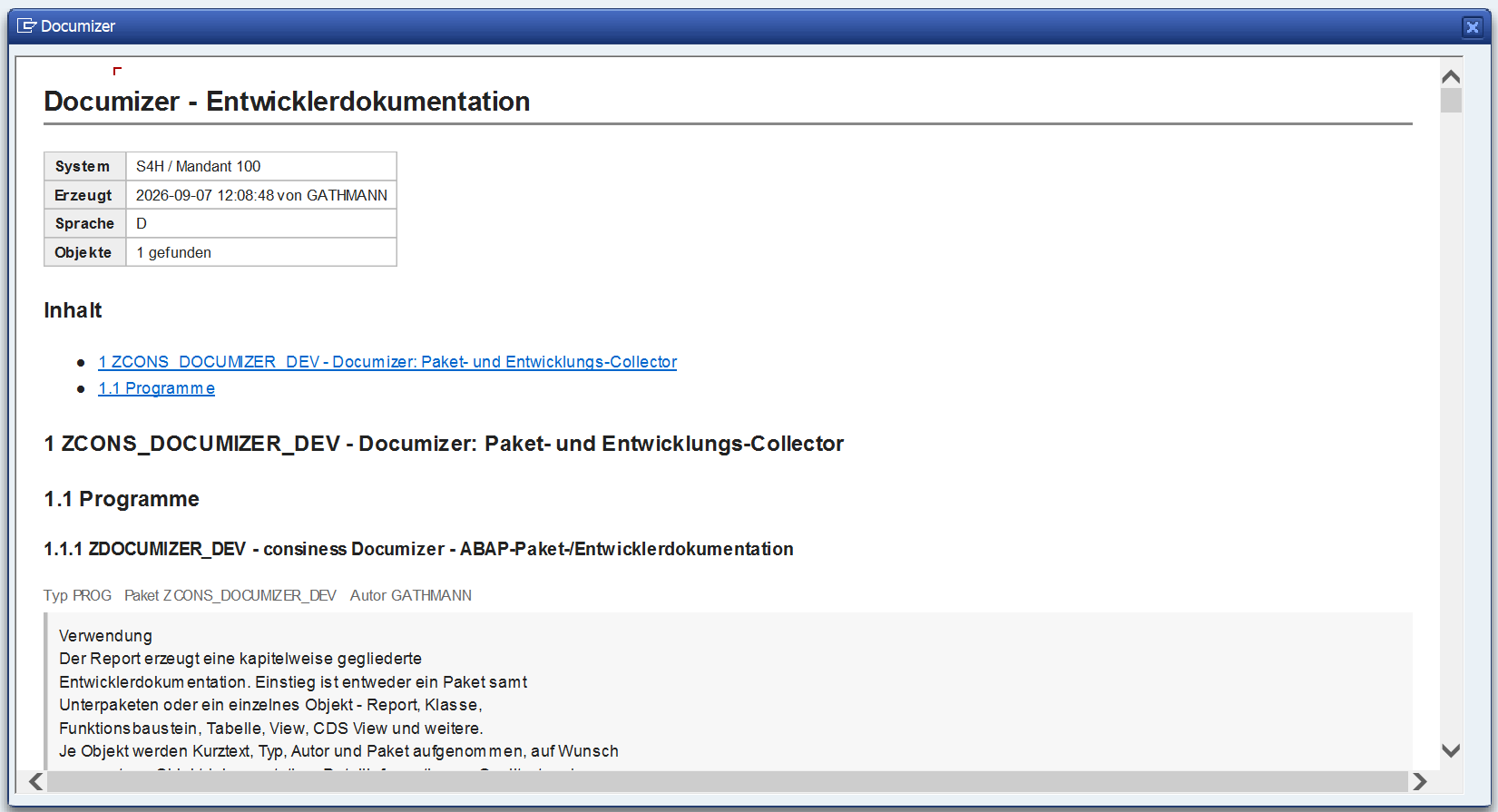
One call, two steps: define the scope – receive the document.
What is captured
Development
The collector follows usages and calls down to a selectable depth and picks up everything the object needs to live – right down to the maintenance apparatus of a table: function group, screens, GUI status, maintenance entry and maintenance transaction. An IDoc basic type pulls in its segment types.
Customizing
The IMG tree with activities, standard documentation and assigned objects; the base table behind every view and every view cluster; the table contents with client handling and delivery class; on request the change documents.
Check configuration
As a third view, a dedicated report documents the check configuration: which ATC check variants apply, which checks they contain, at what priority their messages run and how they can be suppressed.
Captured object types
DOMADTELTABLVIEWDDLSPROGCLASINTFFUGRMSAGTRANVCLSSEGMIDOCWAPABDEFSRVDSRVBDDLX
The way back
The import is not a one-way street. It knows a test run that creates nothing and only reports what it would do. It creates objects in the target package or redirects them via rules ($TMP → Z_PACKAGE1), detects a missing task under the transport request and creates it, and checks afterwards whether everything really is active.
If an object that a setting depends on is missing in the target system, the import writes an error list – an XML file naming exactly those objects. The source system reads it in and exports them in one go. Two runs settle what would otherwise be manual work.
Input for AI
XML is the leading format: structured, complete, lossless. Exactly what an AI needs and what it otherwise cannot get out of a running SAP system. One export replaces the tedious hunt through SE80, SE11 and SE16 with a single file.
Questions this makes answerable
- Which report writes to this table, and under what condition?
- What depends on this data element if I extend it?
- Why does this pricing not apply – which setting is missing?
- Write the functional documentation for this package.
Because documentation and transfer come from the same file, the analysis always reflects the current state of the system – no second maintenance effort, no outdated description next to the code.
Key facts
| Reports | ZDOCUMIZER_DEV development · ZDOCUMIZER_IMG customizing · ZDOCUMIZER_ATC check configuration |
| Installation | One source file per report, copy/paste into SE38, activate. No repository objects of its own, no transport. |
| Output | HTML (self-contained, without JavaScript) and XML (leading format). Download to your PC or store on the application server, also in the background. |
| Languages | German and English. The document follows the selected output language, the run log the logon language. |
| Verification | Built-in roundtrip: serialise, read back in, serialise again, compare. Writes nothing back. |
| Prerequisite | SAP S/4HANA. Read authorisation for the documented objects; development authorisation in the target system for the import. |
Interested in the Documizer?
We are happy to show you the Documizer on your own system – from the first documentation through to the import into the target system.